Getting started
Sign up, choose a plan, and follow the steps on Home.
Sign up with your company name. We email you a 6-digit code; type it in to confirm your email (it works for 30 minutes, and send a new code gets you another). Then choose a plan. Paid plans start with a 14-day free trial and no card is needed. You then land on Home, where Getting your prices ready lists the steps in order and ticks them off as you go. Every step still open has its own button, so you can do them in another order, for example invite your team before you connect a store. This list is only on Home, and it is the same on every plan (a plan without stores has no store steps). At the top of Home, four big buttons open the everyday jobs: Today's rates, Add a product, Prices to approve and your store.
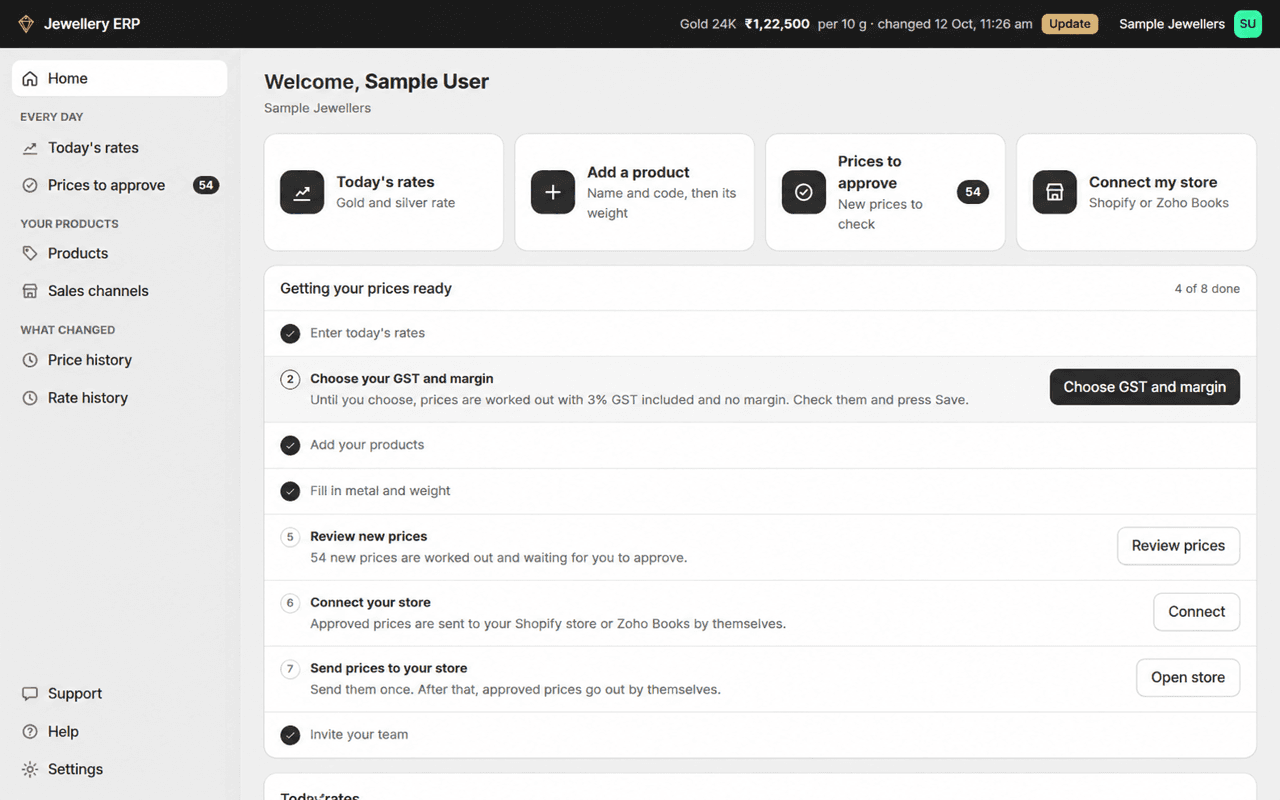
- Enter today's metal rates.
- Choose your GST and margin. Until you save them, prices use 3% GST included and no margin.
- Add your products.
- Fill in each item's metal and weight.
- Review the new prices and approve them.
- Connect Shopify or Zoho Books.
- Send prices to your store.
- Invite your team.
Finding your way around
| Menu | What it's for |
|---|---|
| Home | Your steps, what to do today, today's rates and your plan |
| Today's rates | Every day: the gold and silver rate you type in. The rate also shows at the top of every page, with Update next to it |
| Prices to approve | Every day: new prices worked out after a rate change, waiting for you to approve |
| Products | Your products and their items |
| Sales channels | Your connected Shopify stores and Zoho Books |
| Price history | Every price that changed, when, and who changed it |
| Rate history | Every rate you saved, old and new |
| Support | Your tickets with our team. See Support |
| Settings (bottom left) | General, Pricing, Metals and lists, Users, Plan and billing, API keys |
On a phone, open the menu with the button at the top left.