Price history
Each rate change with the prices it changed and the stores they went to, and every single price change.
Price history in the menu opens on Updates: one line for each time prices changed together. For a rate change it shows the old and new rate (for example the illustrative Gold 22K rate moving from ₹13,800 to ₹14,100 per gram), how many prices changed, the stores those prices were sent to, and who changed the rate.
- Click … prices changed to open the update: every product with its price before and after, and for each one the stores it was sent to and whether that worked. Search there by product name or SKU code to find one product.
- A store is green when every price arrived, and says how many failed otherwise. Not sent to a store means no connected store took the prices yet.
- Approving new prices and changing pricing settings are updates too. A price typed in by hand, imported or sent through the API is not: it is under Every price change.
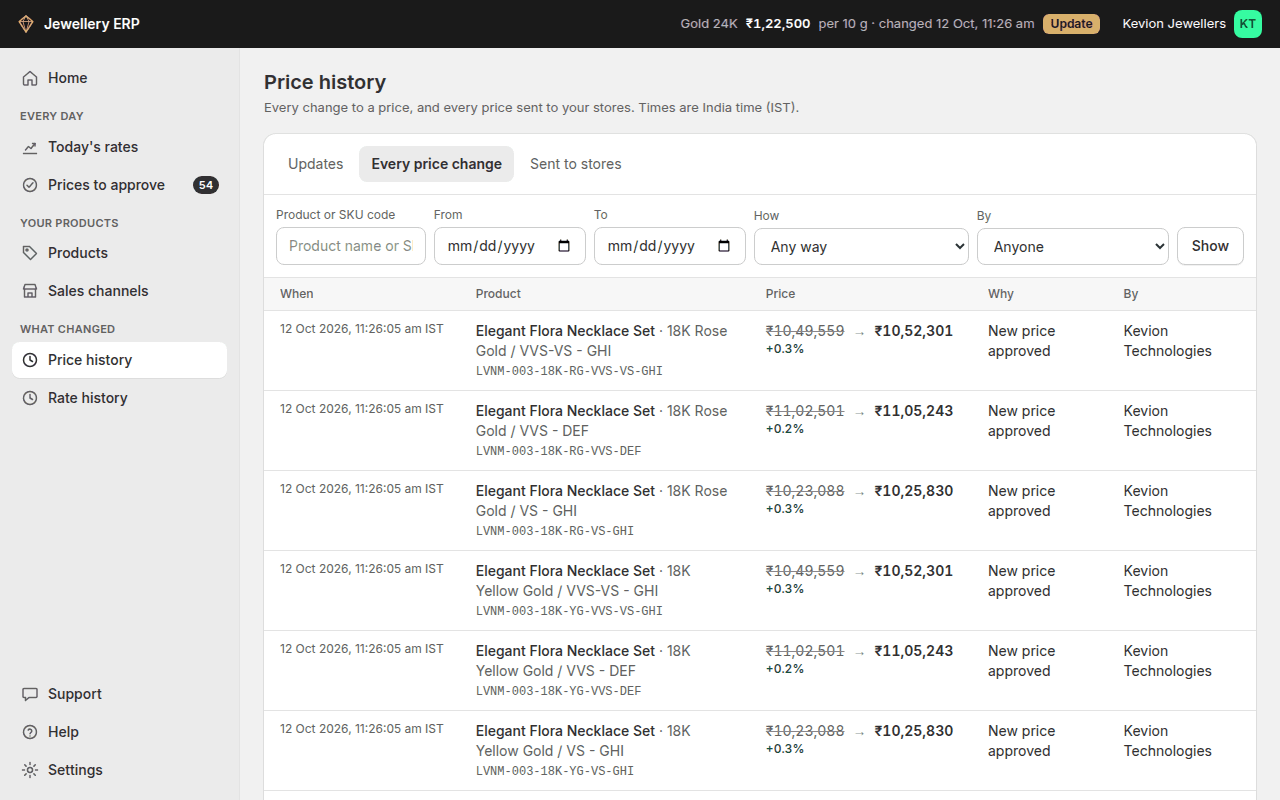
Every price change lists each change on its own: the product, old price → new price with the % change, why it changed, who changed it, and the time.
- Why says what caused the change (click it to open the update it belongs to): "Gold rates changed" when a new rate was put in use by itself, "New price approved" when someone approved it, or that the price was typed in by hand, sent through the API or came with the item from a store.
- By shows the person, the API key, or "The app, automatically".
- Search by product name or SKU code, pick dates, and narrow by How the price changed and By whom. Each filter in use shows next to Showing; click it to remove it.
- Click a product name to open the item. Click its SKU code to see only that item's history.
- Sent to stores lists every price sent to a connected store, with the store's price before and after and whether it was updated or failed.
The screenshot uses sample account names, products and historical prices to demonstrate the interface. It is not customer data or current-market guidance.