Price calculation
How an item's price is worked out, and the pricing settings behind it.
The Price card on each item page shows the Price in use. When a rate, the metal and weight or a pricing setting changes, a New price waiting box appears with the new amount and the difference. Nothing changes in your stores until the owner or an admin presses the Use ₹… button. Open How the new price is worked out to see every line that makes it up.
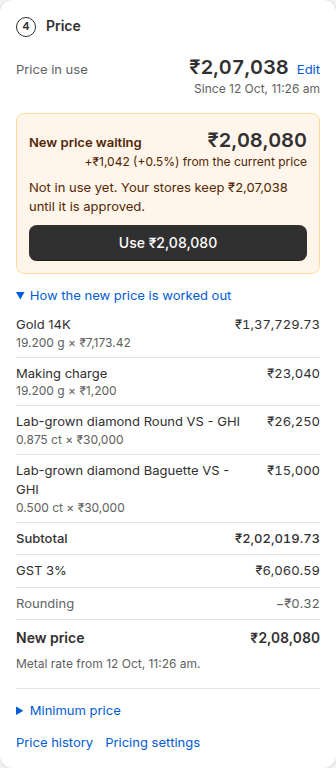
- Metal = net weight × today's rate per gram for that purity.
- Wastage = net weight × wastage % × the same rate.
- Making charge = per gram × net weight, or % of the metal value, or the fixed amount.
- Stones = carats × rate per carat, or pieces × rate per piece, for each line.
- Other charges are added as they are.
- The subtotal gets your markup, then GST, then rounding.
Your own pricing formula
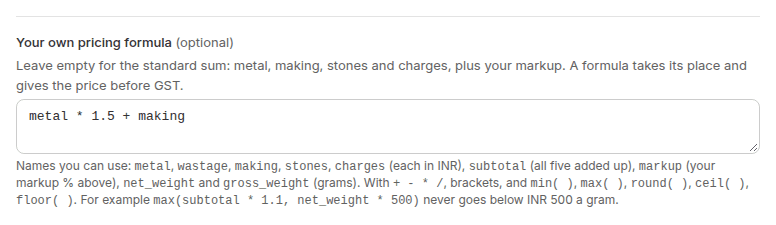
On the Enterprise plan, Settings → Pricing has a box for Your own pricing formula. It takes the place of "subtotal plus markup" and gives the price before GST; GST, rounding and each item's minimum price follow as usual. Leave it empty for the standard sum.
| Name | What it holds |
|---|---|
| metal, wastage, making, stones, charges | Each line of the item, in rupees |
| subtotal | Those five added up |
| markup | Your markup % from the same page, as a number |
| net_weight, gross_weight | The weights in grams |
- Use numbers, the signs **+ - * /, brackets, and min( ), max( ), round( ), ceil( ), floor( )**.
- A margin on metal only, making at cost: **(metal + wastage) * 1.08 + making + stones + charges**
- Never below ₹500 a gram: **max(subtotal * 1.1, net_weight * 500)**
- A formula that can't be read is refused when you press Save, with the reason. If it can't be worked out for one item (for example it divides by that item's stones, and it has none), that item shows No price can be worked out yet and keeps its price.
- Each item's How this price is worked out shows Your formula and what it added.
A worked example
The piece in the picture, with Gold 22K at ₹13,800 per gram:
| Line | Worked out | Amount |
|---|---|---|
| Metal value | 8.20 g × ₹13,800 | ₹1,13,160 |
| Making charge | 12% of metal | ₹13,579 |
| Wastage | 4% of metal | ₹4,526 |
| Hallmark & certification | Fixed | ₹450 |
| Margin | 5% markup | ₹6,586 |
| GST | 3% | ₹4,149 |
| Price | ₹1,42,450 |
This example uses the standard homepage illustration: 8.20 g of 22K gold, 12% making, 4% wastage, ₹450 hallmarking, 5% margin and 3% GST. Other items can have stones and additional charges, each shown on its own line.
- The Use ₹… button puts the new price in use. It shows in Price history and goes to connected stores that send new prices by themselves. If rates or settings changed since you opened the page, it asks you to check the new figures first. Staff can use it on an item too, unless it is a big change (more than your Ask me first limit): that one waits for the owner or an admin. Approving many at once under Prices to approve is also for the owner or an admin.
- Minimum price, folded at the bottom of the card, is a floor: the worked-out price never goes below it.
- If something is missing (a metal rate, the net weight or a stone rate), the card lists it instead of a price, so a half-worked price is never put in use.
Pricing settings
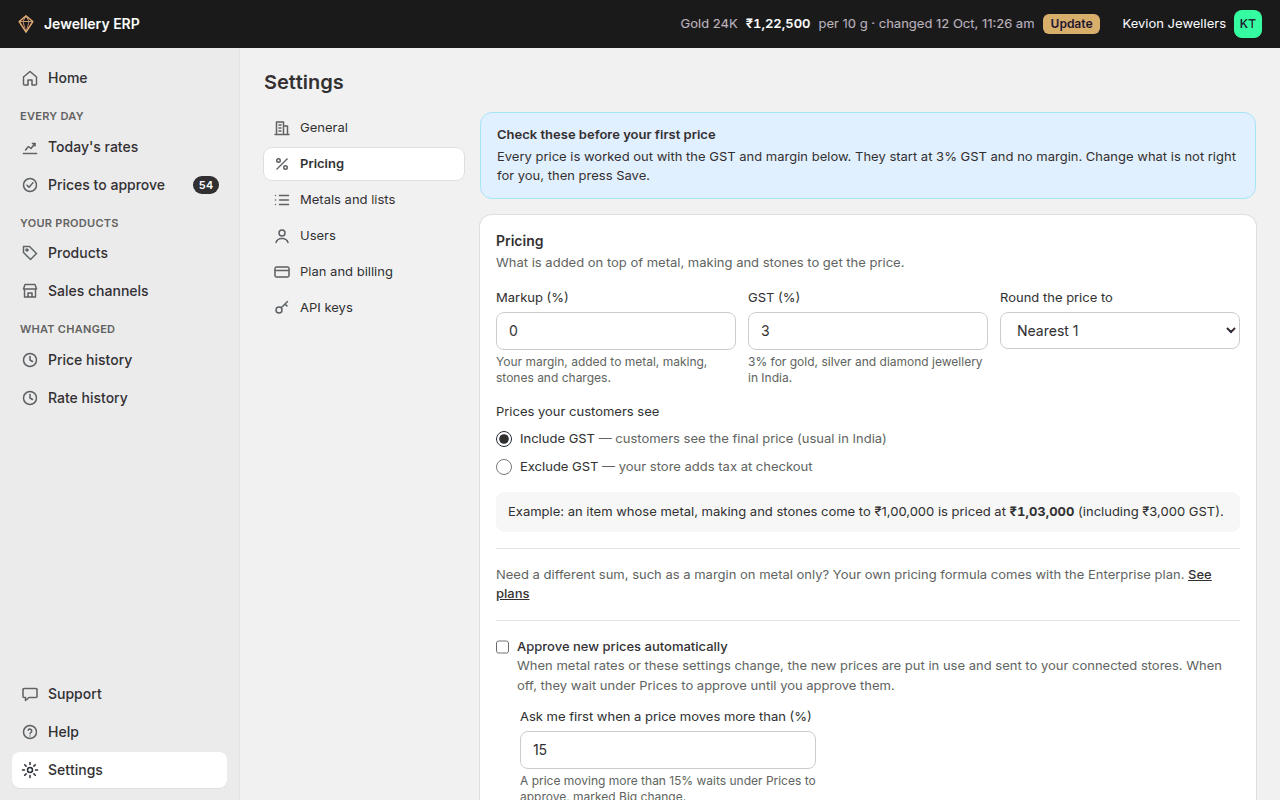
The settings screenshot below uses a separate generic ₹1,00,000 illustration to explain the GST control; it is not the worked example above.
| Setting | Starts at | What it does |
|---|---|---|
| Markup (%) | 0 | Your margin, added to the subtotal before GST |
| GST (%) | 3 | The GST rate on gold, silver and diamond jewellery in India |
| Prices your customers see | Include GST | Include: customers see the final price. Exclude: your store adds tax at checkout |
| Round the price to | Nearest 1 | No rounding, or the nearest 1, 10 or 100 |
| Approve new prices automatically | Off | See Prices to approve |
| Ask me first when a price moves more than (%) | 15 | On plans with the approval flow. See Prices to approve |
The example line under the settings shows the price of an item whose metal, making and stones come to ₹1,00,000, as you type. Only the owner or an admin can change pricing settings.